Khanka
✓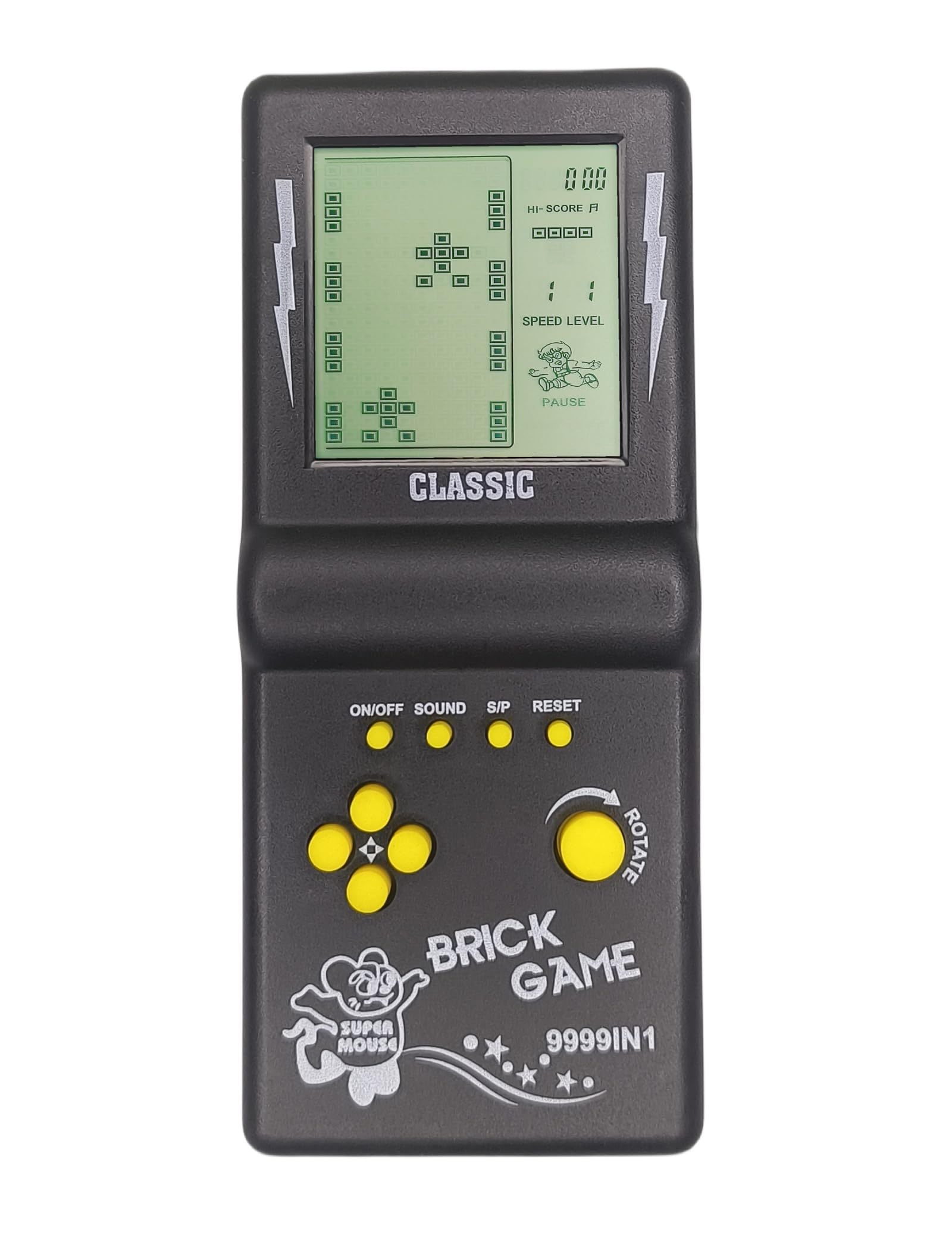
Product description Function key instructions 1.ON/OFF : Press ON/OFF key to turn on or off the game. 2. ROTATE: Press ROTATE key to select games before to start,it takes action in the selected game. 3. SOUND:Press Sound key repeating to turn off or turn on the sound. 4. S/P (Start/Pause):Press S/P key to start or pause the selected game. 5.RESET:Press RESET to reset the game system. 6. UP/DOWN:Before starting the game, press UP/DOWN to select the mode of the selected game; In the game, press the UP/DOWN key to control the up/down direction of the game. 7. LEFT/RIGHT: Press LEFT/RIGHT keys to select the level(LEFT) and the speed(RIGHT) of the selected game before to start it.Press LEFT/RIGHT keys to control the left/right direction in game. Game list and Instructions Built-in 23 Games: 01.Classic Block game:LEFT/RIGHT key control direction, ROTATE key to deformation. 02-08.Other Brick game:LEF /RIGHT key control direction, ROTATE key to deformation. 09.Tank Battle:UP/DOWN/LEFT/RIGHT key control direction, ROTATE key to launch bullets. 10.Racing game:LEFT/RIGHT key control direction, ROTATE key to accelerate. 11.Pinbal:LEFT/RIGHT key control direction, ROTATE to speed up the ball movement speedl. 12.Shooting:LEFT/RIGHT key control direction, ROTATE key launch bullets. 13.Obstacles Pinball:LEFT/RIGHT key control direction, ROTATE to speed up the ball movement speedl. 14-15.Fill Shooting:LEFT/RIGHT key control direction, ROTATE key fired bullets. 16-23.Various Reverse Block game:LEFT / RIGHT key control direction, ROTATE key to deformation. Directions 1. ON/OFF: Press ON/OFF key to turn on or off the game. 2. ROTATE: Press ROTATE key to select games before starting, it takes action in the selected game. 3. SOUND: Press Sound key repeatedly to turn off or turn on the sound. 4. S/P (Start/Pause): Press S/P key to start or pause the selected game. 5. RESET: Press RESET to reset the game system. 6. UP/DOWN: Before starting the game, press UP/DOWN to select the mode of the selected game; In the game, press the UP/DOWN key to control the up/down direction of the game. 7. LEFT/RIGHT: Press LEFT/RIGHT keys to select the level (LEFT) and the speed (RIGHT) of the selected game before starting it. Press LEFT/RIGHT keys to control the left/right direction in the game.
You might also like